


Resident Portal
4.810.13K Reviews
App Specs
- Version
- 5.69.1
- Updated On
- License
- Free
- Downloads
- 1,000,000+
- Developer
- Entrata, Inc
- Categories
- Lifestyle
- Platform
- Android, iOS
Screenshots
 Analysis by AppCompare
In my experience, a resident app is most useful when it turns small housing chores into a repeatable routine rather than another place to check. Resident Portal is built around that practical role: it gives residents a way to handle rent, send maintenance requests, and communicate with their property from a phone. I’d treat it as a shared doorway to services offered by a participating property, not as a universal apartment-management tool that works independently of a landlord’s setup.
A useful routine starts with access
Before relying on the app for a deadline, I’d first make sure I can sign in with the credentials connected to my property. Entrata, Inc develops this free lifestyle app, and a property’s own setup is central to whether the available resident services are ready to use. If access is not working, or a payment or request option is missing, the sensible first step is to contact the property team rather than assume the phone app can activate those services on its own.
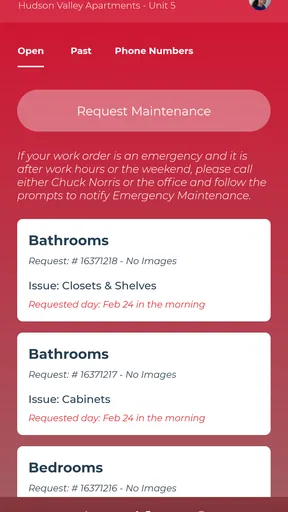
Once I’m in, I’d use the home screen as a practical starting point: deal with the immediate task, then check for property messages that might affect it. For example, if I need to report a dripping sink, I’d describe what is happening clearly and include a photo if the request flow offers that option. A concise description helps staff understand the issue without a follow-up just to identify the location or problem. I’d keep the wording factual and avoid treating a submitted request as proof that the repair is already scheduled.
Settings and choices worth checking
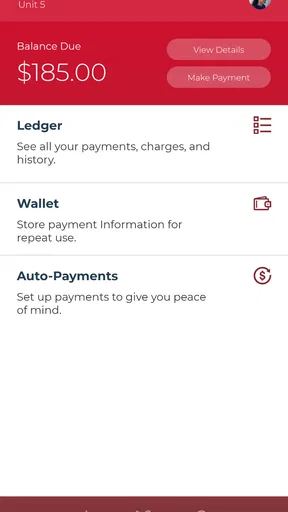
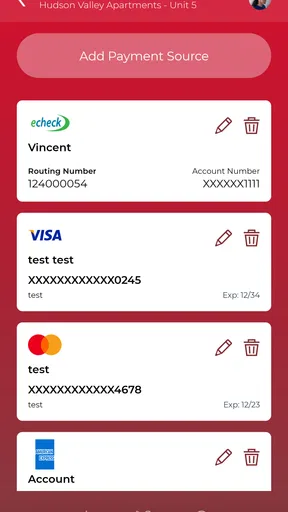
For rent, the key question is not simply whether payment can be made in the app; it is which payment options and reminders your property has made available. I’d inspect those choices before the due date and confirm the amount and destination shown in the payment flow before submitting anything. If an automatic-payment option is available in your account, it may reduce the chance of forgetting a recurring task, but I would still check that the arrangement suits my budget and that the payment details remain current.
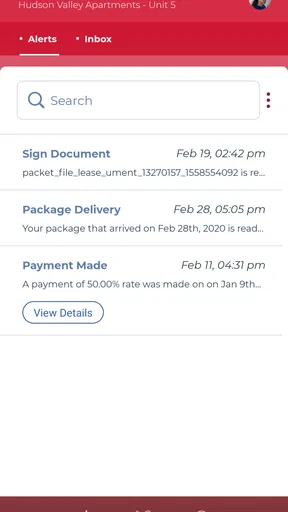
I would also decide how I want property communication to fit into my day. If the app offers notification controls on your device, keeping relevant alerts enabled can help you notice a reply or time-sensitive building notice; if every alert is distracting, adjusting device notifications may be a better balance. The useful habit is to check messages deliberately rather than assume that a notification, or its absence, tells the whole story. For an urgent problem, I’d use the property’s stated urgent-contact process instead of relying on an in-app message alone.
Small habits that make repeat tasks easier
A practical rhythm is to check rent and property messages together, then use the maintenance request flow as soon as a problem is clear enough to describe. I’d save a short note with the details I commonly need when reporting an issue—such as which room is affected and when I first noticed it—so I can provide a useful account without rewriting the same explanation from memory. That is a personal workflow, not a special feature, but it makes a maintenance report more actionable.
For a repair that changes over time, I’d take a clear photo when I submit the request and keep a separate note of any later changes. If the portal provides a way to review request progress, I’d use it to check the status before sending a second message; duplicate reports can make it harder to follow the original conversation. If the app does not show enough detail for my situation, I’d contact the property team directly and refer to the issue I already reported.
Worth Reading Before You Choose

EA SPORTS FC Mobile 26 Is a Bigger Football Game, but It Takes Time

Flipboard Shows What News Apps Must Do Beyond the Feed

Switching to Android Auto Means Rethinking Your Driving Routine

Google Calendar Makes a Crowded Week Easier to Manage

Ludo King Makes the Most of the Minutes Between Plans

Baby Panda World Brings Quick Play to Modern Phones, but Its Game Library Feels Busy
Compared with paying through a bank, sending an email, or calling the leasing office, one resident portal can keep routine property tasks closer together. That convenience has a trade-off: it is tied to the participating property’s process, so it does not replace a bank’s own payment records, a lease, or a direct conversation when a matter needs careful attention. I’d keep payment confirmations and important correspondence available through the channels I normally use, especially when resolving a dispute or checking a deadline.
Where the convenience has limits
This app is most appealing to residents whose property actively uses its portal and keeps the relevant services available there. It can be less useful if you rent from an owner who handles everything by phone or email, or if you need a tool that manages several unrelated properties in one place. In those cases, the existing contact method may be more reliable than adding an app that your property does not support.
I would not use a resident portal as my only plan for urgent maintenance, a sensitive lease question, or a payment problem close to a deadline. An app can make it easier to send information, but the property’s response and procedures still matter. If I’m uncertain whether a request went through, I’d look for an in-app confirmation or request record if available, then follow up with the property using its established contact method. That extra check is more useful than repeatedly tapping submit.
It is also worth separating app access from property policy. Having a payment or maintenance option on a screen does not determine when rent is due, what a repair covers, or how quickly staff will respond. I’d use the portal to communicate and keep track of routine tasks, while checking my lease or asking the property team when the actual rule or commitment is unclear.
Who will get the most out of it
I’d recommend trying it if your building relies on the portal for ordinary resident tasks and you want a single place to begin with rent, repair requests, and property communication. It may particularly suit someone who prefers handling small administrative chores on a phone and wants a repeatable way to report issues. Residents who rarely use mobile apps can still benefit if the portal is the property’s main route for requests, but they should make sure they can sign in and understand how to get help if access fails.
Someone who prefers speaking to a person for every issue, rents in a property that does not participate, or needs detailed financial planning should not expect this app to replace those alternatives. A bank app may be better for broader money management, while a direct call or email may be better for a complicated conversation. I see the portal as a convenient property-specific channel, not a reason to abandon other records or contacts.
The app has a 4.8 average from around 73,000 ratings, and it has been installed over a million times. It is rated for Everyone, so its audience is broad, but the practical value still depends on whether a resident’s property has configured the services they need. Its current version is 5.66.0, and it supports devices running Android 8.0 or later. Those details make it easier to judge basic fit, while property access remains the most important first check.
The Basics: What Exactly is the Resident Portal?
So, here's the deal. The Resident Portal is an app designed to streamline the property management experience for renters and property managers alike. It’s available on both Android and iOS, making it super accessible no matter what device you’re rocking. You can handle everything from paying rent and submitting maintenance requests to managing community events—all from your smartphone. It’s like having a Swiss Army knife for your apartment needs!
Getting Started: Easy Peasy Setup
Setting up the app is as straightforward as it gets. Once you download the app, you’ll just need to log in with your property’s credentials. If your property manager has set everything up on their end, you should be good to go in just a few taps. The interface is pretty intuitive, so even if you’re not the most tech-savvy person, navigating through the app should be a breeze. It's designed with the user in mind, ensuring that you spend less time fiddling with settings and more time actually getting stuff done.
Features That Make Life Simpler
Now, let's talk features. The app doesn’t just stop at rent payments. Oh no, it goes way beyond that. Here’s a quick rundown of what you can expect:
- Rent Payments: No more writing checks or hunting down money orders. You can pay your rent right in the app. Set up automatic payments, and you’ll never have to worry about late fees again.
- Maintenance Requests: Submit and track maintenance requests without having to make a single phone call. You can even attach photos to make sure the maintenance team knows exactly what’s up.
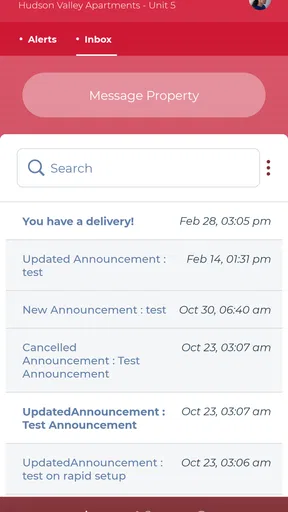
- Community Announcements: Stay in the loop with what’s happening around your community. From events to important notices, you’ll get all the updates directly in the app.
- Secure Messaging: Need to get in touch with your property manager? The secure messaging feature lets you communicate without leaving the app.
Using the App: A Day in the Life
Picture this: It’s the first of the month, and instead of stressing about rent, you just open the app, tap a few buttons, and voilà—rent paid! Later, you notice a leaky faucet. Instead of calling and waiting on hold, you just snap a pic, submit a maintenance request, and get back to binge-watching your favorite show. Later, you get a notification about a community BBQ happening this weekend. Sweet! All of this happens within the app, keeping things organized and hassle-free.
My Personal Take: Why I’m a Fan
I’ve got to say, the convenience factor is off the charts. The portal has made managing my apartment life so much smoother. No more scrambling to remember due dates or worrying about whether my maintenance request was received. Everything is tracked and managed in one place, which is a game-changer for my busy lifestyle. Plus, the app’s layout is clean and user-friendly, which is always a plus in my book.
If you're living in a property that supports this app, I’d highly recommend giving it a shot. It’s like having a personal assistant dedicated to making your renting experience as seamless as possible. Who wouldn’t want that?
Pros
- User-friendly interface for easy navigation.
- Real-time updates on community events.
- Secure online payment options.
- Access to maintenance requests 24/7.
- Push notifications for important alerts.
Cons
- Limited customization of user settings.
- Occasional login issues reported.
- Notifications can be overwhelming.
- Some features require a fast internet.
- Customer support response can lag.
FAQs for Resident Portal
What is the Resident Portal app used for?
The Resident Portal app is designed to enhance the living experience for residents in managed communities. It allows residents to pay rent, submit maintenance requests, and communicate with management effortlessly. This app streamlines several day-to-day tasks, making it a must-have for residents wanting convenience at their fingertips.
How secure is the Resident Portal app for online payments?
Security is a top priority for the Resident Portal app. It uses advanced encryption technologies to protect your financial information during transactions. Additionally, the app complies with industry standards to ensure that your personal data is safeguarded against unauthorized access and fraud.
Can I access the Resident Portal app on both Android and iOS devices?
Yes, the Resident Portal app is available for both Android and iOS platforms. You can download it from the Google Play Store or the Apple App Store, ensuring compatibility with a wide range of smartphones and tablets, allowing you to manage your residential needs from any device.
What features does the Resident Portal app offer beyond paying rent?
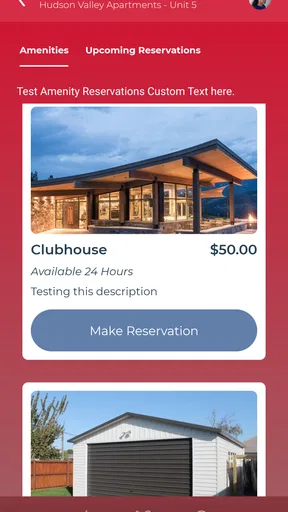
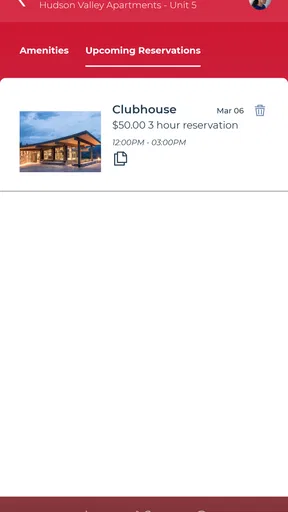
Beyond rent payments, the Resident Portal app offers a variety of features including maintenance request submissions, community announcements, and resident-to-management communication tools. It may also include options for booking amenities, accessing community documents, and connecting with neighbors, depending on your community's offerings.
Is there a cost associated with using the Resident Portal app?
The Resident Portal app itself is typically free to download and use. However, any fees incurred would be related to the services provided by your property management, such as convenience fees for certain payment methods. It’s best to check with your community management for specific details.


